 Toby McGuire
Finding a balance between low latency and accurate collisions
My first goal was to try and get everything as low latency as possible so everyone could see each other's movements in real time. This was a naive approach, since in the real world there is no such thing as 0 second latency for everyone in an online game.
However, without instant response, collisions started having exponentially worse error. I had to balance these two aspects of my game:
- Low-latency inputs. The player who launches should see it the moment they press the button, so their input has to act on their own screen right away.
- High-accuracy collisions. Hits have a big impact on the state of the game, if they are inaccurate on one screen it can be visually jarring at best, and make a player feel cheated at worst.
Here's a fun widget to visualize how even a little bit of latency can have a big effect on a simple collision:
This is a simplified version of the issue to get the basics across. In reality there are other issues such as non-deterministic physics that I had to rewrite, different speeds, etc.
The Fix: Buffered inputs, client prediction, and visual smoothing
I had to compromise on my initial goal of low-latency inputs by buffering inputs, but lie to the client about this by pretending their inputs are immediate.
There are three pieces needed to pull this off:
- Input buffering. Inputs are held for a fixed buffer time and applied on a scheduled tick instead of the instant they arrive. This has the downside of delaying user inputs, so we lie to the player with the next two pieces.
- Client-Side prediction We play all the user's inputs immediately as they use them on their screen, moving the visuals as if they have 0 latency.
- Visual Smoothing When the client receives correct position information from the server, it smoothly interpolates from where the client thinks they are to where they are on the server. Because of input buffering, this usually isn't too big of a difference.
The demo below reruns the same collision with the first two fixes applied (no smoothing):
Once again, this is simplifying a lot of the issue, but is a good start.
The cost is a fixed input delay, plus a visible correction when a connection is worse than the buffer covers. For a game decided by collisions, that's the right trade.
Prediction and reconciliation: Letting the client lie, then correcting it
Since the client is pretending inputs happen instantly, it needs a way to find out what really happened and fix itself. Player input runs through a tick based FishNet replicate step, so the player never has to wait a full round trip to see their own charge and launch.
The server is still the one in charge though. Every tick it sends back a reconcile snapshot of what actually happened, and the client rewinds to that snapshot and replays all of its inputs from there. This is also what catches an input that shows up after the buffer has run out.
Getting this to work came down to a few things:
- Small, exact state. Sumo runs its own 2D physics world, so a player's whole physics state is just position and velocity. That means a snapshot can restore it exactly.
- Everything that can change mid-rollback has to travel too. Charge amount, the shrink ability's charge speed multiplier, shield and freeze body modes, collision flags, and the remaining slices of a multi-tick launch. If even one of these is missing, the replay slowly drifts away from the server.
- Cheap on the wire. Delta compression means fields that rarely change only cost about one bit per tick until they flip.
- Other players are interpolated. Remote players aren't predicted, they are drawn by a visual smoother that buffers the authoritative per tick samples.
Using Steam for lobbies
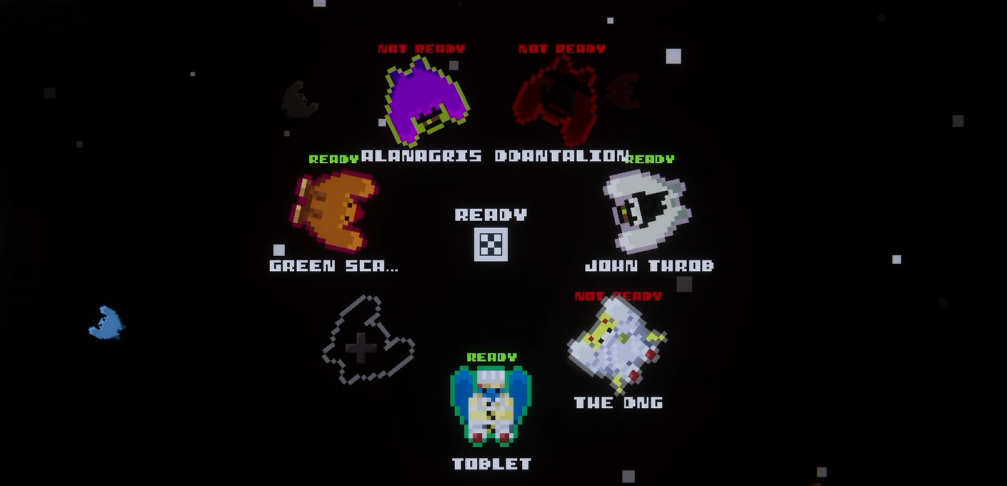
Since the game is on Steam, I built the lobbies on top of Steam friends, invites, and privacy modes. The host can toggle rounds, hazards, and abilities for the whole group, bots fill any empty slots, and controllers get the correct glyphs through Steam Input.
I also added a calmer Fishing mode for in between fights, so a group has a reason to stay in the same lobby.
Debugging
Netcode bugs only really show up under bad conditions, so I built some tools to create those conditions and measure them:
- Prediction overlay. A dev only overlay (F3) shows the round trip time and every reconcile correction over a rolling window. This way a desync shows up as a number instead of just a feeling.
- Tick-rate-independent smoothing. Rotation and velocity damping use exponential smoothing instead of a raw per tick lerp, so the game feels the same no matter what the tick rate is.
- Editor tests. Unit tests cover content ID assignment, cosmetic sanitizing, entitlement filtering, and nameplates.